


For an angel-themed photoshoot, you can wear a physical wing prop, add wings during editing or combine an actual costume with later adjustments. The choice affects preparation, the way you pose and what you can record on the day.
Decide what you need from the finished material before committing. A single still portrait has different requirements from a gallery of angles, a behind-the-scenes clip or a costume that will also be worn at an event.

What a physical prop gives you
A real pair is present in the scene. The photographer can see its shape alongside the person, clothing and background, and you can review the combination in a test frame. That makes the actual outline part of the session rather than an element selected afterward.
A physical prop also has dimensions and fitting requirements. Large angel wings need usable space, a suitable outfit and preparation time. Buying a pair does not remove the need for a rehearsal, particularly when the costume includes a powered mechanism.
What a digital workflow changes
Adding wings in editing avoids bringing that physical prop into the session, but the image still needs planning. The camera angle, body position, background and light all affect how a later wing element will look. An unsuitable base photograph can create extra work.
Adobe describes Generative Fill as a way to add and alter image content using prompts. That capability is an editing option, not a promise that any result will have the right anatomy, detail or consistency for your project.
Ask whether you need movement footage
A pair of moving wings can appear in a costume video as well as in still photographs. If movement is part of the deliverable, discuss it before choosing a still-photo editing plan. Adding a wing element to one photograph is a different task from creating consistent movement across a clip.
The Angel Wings collection contains electric flapping designs. Watch a real demonstration and check the operation of your chosen style. The physical video below shows one store setup; it does not demonstrate a digital effect or every product variant.
Compare the preparation costs you actually face
For physical props, consider the purchase, making and delivery time, packing, fitting and the available shooting space. For digital work, consider the time and skills needed for editing, the software or service you will use and the requirements for any third-party assets.
Neither route has a universal lowest cost. A photographer who already owns suitable props faces a different decision from a first-time buyer. An experienced editor faces a different task from someone trying a new technique just before a deadline. Use your own project rather than an unsupported price comparison.
Prepare the base image for your chosen route
For a physical setup, frame the full spread in at least one test photograph and check the attachment with the outfit. For a digital setup, give the editor a clear brief before the session and confirm the views and space they need around the subject.
If you plan to use another person's wing image, check that you have permission for the intended use. A picture appearing in search results is not automatically a reusable asset. Keep the original capture and a copy of the editing brief so later revisions do not depend on guessing what happened.
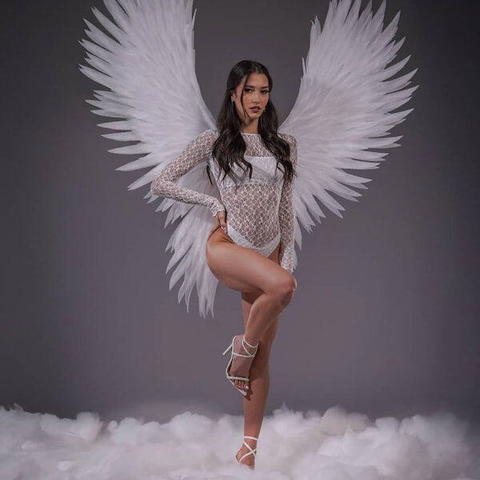
Be clear about what the photograph represents
A fantasy portrait may contain creative editing. A product demonstration has a different job: it should show the actual item and avoid implying that an added shape or invented motion belongs to the product. Keep those uses distinct in your planning.
For your own project, agree with the photographer or editor on the level of alteration and the files you will receive. If the final gallery needs a consistent style, request a sample edit before the whole set is completed.
Choose around the deliverables
- Physical wings: consider them when the actual costume and movement are part of the session.
- Digital wings: consider them when the project is designed around edited still images.
- A combined approach: plan which parts are real and which will be changed before shooting.
If a real pair fits your project, compare the wing collection and confirm fit and timing. Choosing the workflow first makes the prop decision more useful.